
cloudworx.components - send
 X
X
cloudworx.send is part of cloudworx.components. These are our tools for Salesforce that offer features that are missing from other process design solutions available on the market.
For more information about cloudworx.send and our other components, feel free to give us a call or send us an email.
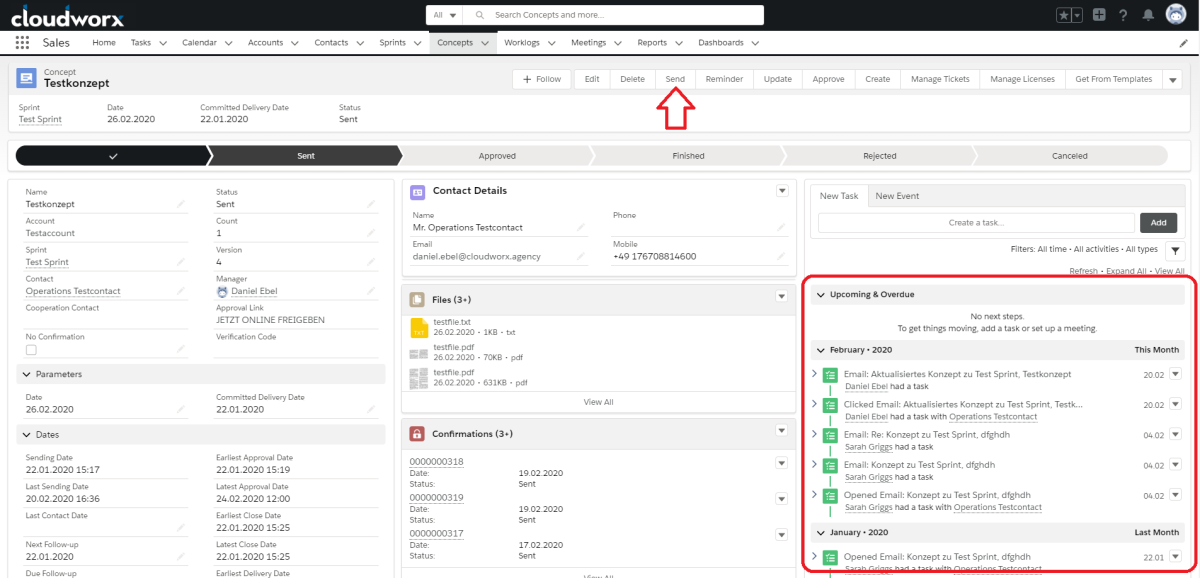
cloudworx.send is our solution for sending emails from Salesforce. The emails are listed in the interface at the bottom left and are automatically updated without you having to do anything.
Sending emails from Salesforce? Isn't that already possible?
Yes, it is. But on closer inspection, there are several limitations that we don't like. That's why we developed cloudworx.send.
Salesforce sends emails ‘on behalf of’. This is a cryptic note in the header of the email that is displayed to the email recipient in most clients. This looks unprofessional and can cause confusion.
There are also limits on the number of emails that can be sent – specifically, a maximum of 5,000 emails can be sent to individual recipients.
With cloudworx.send, you no longer have these problems.
Emails can now be sent directly via your company's own SMTP server, with no restrictions on attachments, sender branding, delivery rates or the number of emails sent.
 X
X
You are at the quotation stage. From lead generation to completed transaction, you manage all business processes in Salesforce. Depending on the progress of the process, the order is assigned a different status. You create a quotation, send it to the customer, the customer accepts the quotation and you can consider the transaction successfully completed, or the customer rejects it. For each of these stages, the quote goes through the respective status, which is logged by the employee. This means that a different email template is required for communication with the customer for each status.
None of this is a problem, as we automate it for you. When you press the ‘send’ button, you are taken directly to the template for the respective status, automatically and without having to scroll through endless lists.
 X
X
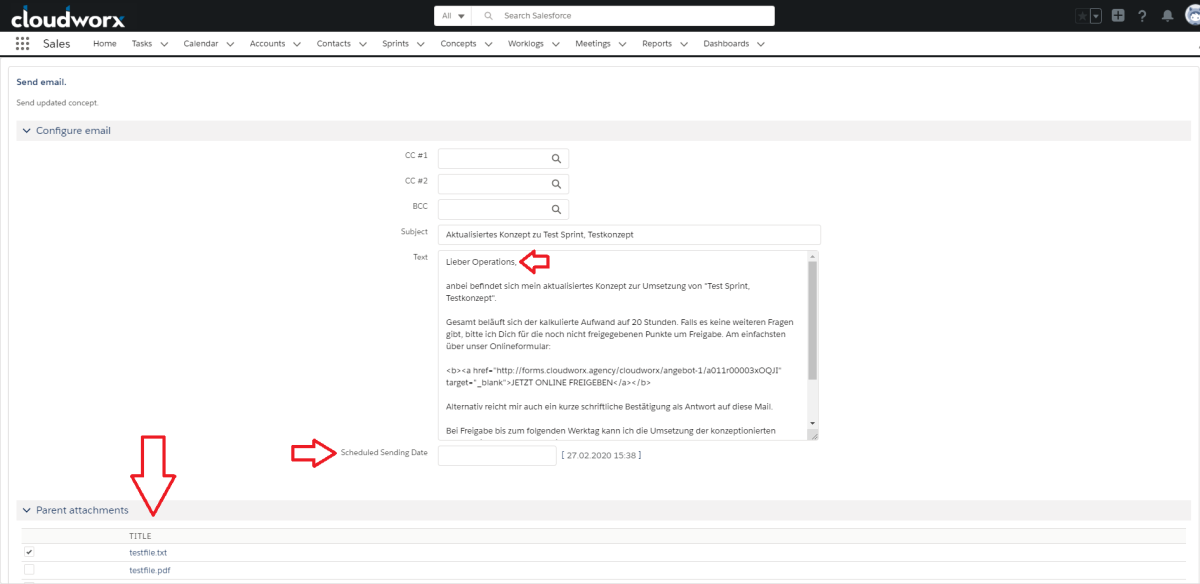
The window displays a normal email view. The contact information has already been retrieved from Salesforce and all variables such as name, title (you/you) and gender have been integrated into the respective email template. These fields are called merge fields because they merge information from the rest of the system with the templates. If you make changes to field information for specific objects, such as the name or address of the contact, in other parts of the system, the information in your template will also change automatically. If necessary, you can of course change or add to the template yourself, but the likelihood of errors creeping in is much lower than with manually created texts, provided that the relevant field information has been entered correctly into the system beforehand.
At the bottom of the screen is a list of attachments that have been logged during the business process, which can also be preselected if desired. The most recently added attachment is at the top.
You can also determine whether the emails should be sent immediately or at a later time.
However, you can also fully automate the sending process – emails are then sent automatically depending on the status of the contact in the process. When someone signs up for a newsletter or fills out a form online, the system simply sends the emails automatically.
You also have the option of tracking whether and how often the customer has already read your email. This gives you the opportunity to follow up if necessary.
The status, dispatch date and other relevant fields are automatically updated after dispatch.
It's that simple. Without any effort on your part.
For more information about cloudworx.send and the cloudworx.components, please feel free to call us or send us an email.
The author
Timo Müller
Founder and CEO of cloudworx






Timo Müller, the man behind cloudworx, is an entrepreneur with a passion. He has always had two loves in his life – technology and business. After several start-ups, challenges, setbacks and successes, one thing has become increasingly clear: his love, talent and enjoyment of optimising work processes.